Use these steps to set up your replacement receiver.
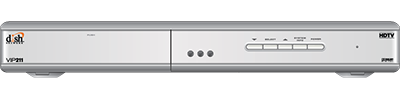
1. Unpack the new receiver
Take everything out of the box.
2. Swap the old and new receivers
If you can, set the new receiver on top of the old one. Then move the cables over one at a time. If you can't, note which port each cable plugs into on the old receiver. Then unplug them.
One-Room Non-DVR:

One-Room DVR:
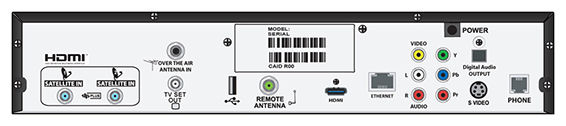
3. Connect the wall cables to the receiver
Find the diagram that matches your receiver. Screw the coax cables into the ports labeled Satellite In. Then follow the cables to the wall and make sure each one is hand-tight.
One-Room Non-DVR:

One-Room DVR:
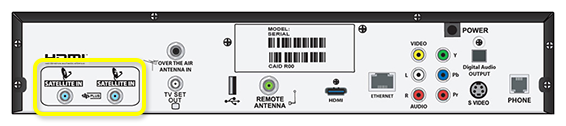
4. Connect the receiver to your TV
Plug your video cable into the back of the receiver. Make sure the other end is plugged in tight at the TV.
5. Connect the remote antenna
Unscrew the remote antenna from the old receiver. Then screw it onto the new one.
6. Turn on the receiver
Plug the receiver's power cord into an outlet. Then press Power on the front of the receiver.
7. Look for the installation wizard
The installation wizard will show up on your TV.
8. Program the remote
On your DISH remote, press SAT, then press Record. A number will show up in the box on your TV screen. Then select Continue.
9. Let the software download
Your receiver will download software on its own. This can take up to 20 minutes. When it's done, it'll go to the next step. If it hasn't moved on after 20 minutes, contact us.
10. Set your video resolution
Choose the highest resolution your TV supports. Not sure? Try 1080i (HD) first, or check your TV manual. Select Test, then Save.
11. Let the connection test finish
Your receiver will test its phone and internet connection on its own. This can take up to 3 minutes. When it's done, select Continue. If the test isn't done after 3 minutes, contact us.
12. Activate your new receiver
If your receiver is connected to the internet, it may start to activate on its own. If it doesn't, sign in at mydish.com/equipment to activate it, or contact us.
13. Select Live TV
Select Live TV.
14. Let the receiver find the signal
Your receiver will look for the satellite signal. This can take up to 5 minutes.
15. Let the program guide download
Your program guide can take up to 10 minutes to download.
16. Restore recordings (optional)
If you have a DVR and you backed up your recordings, you can restore them now.
17. Recycle or throw away your old receiver
You don't need to return your old receiver to DISH. You can recycle it or throw it away safely.
18. Contact us
If the steps above didn't resolve your issue, give us a call at 800-333-3474, or chat with an expert agent online.
1. Unpack the new receiver
Take everything out of the box.
2. Swap the old and new receivers
If you can, set the new receiver on top of the old one. Then move the cables over one at a time. If you can't, note which port each cable plugs into on the old receiver. Then unplug them.

3. Connect the wall cables to the receiver
Find the ports labeled Satellite In and Home Distribution. Screw the coax cables into them. Then follow the cables to the wall and make sure each one is hand-tight.

4. Connect the receiver to your TV
Plug your video cable into the back of the receiver. Make sure the other end is plugged in tight at the TV.
5. Connect the remote antenna
Unscrew the remote antenna from the old receiver. Then screw it onto the new one.
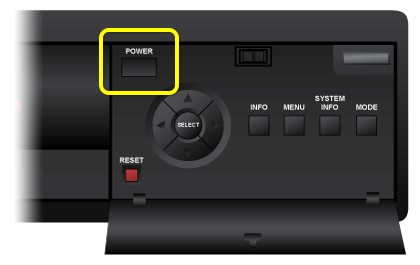
6. Turn on the receiver
Plug the receiver's power cord into an outlet. Then press Power on the front of the receiver.
7. Look for the installation wizard
The installation wizard will show up on your TV.
8. Program the remote
On your DISH remote, press SAT, then press Record. A number will show up in the box on your TV screen. Then select Continue.
9. Get the remote for your second TV
This receiver can run two TVs. If you have a second TV hooked up to it, go get the remote from that room. Bring it to the room where you're setting up the new receiver. Don't have a second TV? Skip to step 11.
10. Program the second remote
On the second TV's remote, press SAT, then press Record. A number will show up in the box on your TV screen. Take the second remote back to the room with the second TV. Then, on your main remote, select Continue.
11. Let the software download
Your receiver will download software on its own. This can take up to 20 minutes. When it's done, it'll go to the next step. If it hasn't moved on after 20 minutes, contact us.
12. Choose the channel for your second TV
On your TV screen, select the channel your second TV is tuned to. Not sure which one? Go check your second TV. If you see a DISH message on it, you picked the right channel. Then select Continue.
13. Set your video resolution
Choose the highest resolution your TV supports. Not sure? Try 1080i (HD) first, or check your TV manual. Select Test, then Save.
14. Let the connection test finish
Your receiver will test its phone and internet connection on its own. This can take up to 3 minutes. When it's done, select Continue. If the test isn't done after 3 minutes, contact us.
15. Activate your new receiver
If your receiver is connected to the internet, it may start to activate on its own. If it doesn't, sign in at mydish.com/equipment to activate it, or contact us.
16. Select Live TV
Select Live TV.
17. Let the receiver find the signal
Your receiver will look for the satellite signal. This can take up to 5 minutes.
18. Let the program guide download
Your program guide can take up to 10 minutes to download.
19. Restore recordings (optional)
If you have a DVR and you backed up your recordings, you can restore them now.
20. Recycle or throw away your old receiver
You don't need to return your old receiver to DISH. You can recycle it or throw it away safely.
21. Contact us
If the steps above didn't resolve your issue, give us a call at 800-333-3474, or chat with an expert agent online.
 Your privacy choices
