Error numbers: 015, 015a, 015n, 015x, 015y, 015z, 022, or 535
Signal Loss
Signal loss is usually the result of severe weather. If there are active storms in your area, your signal will likely return on its own. In the meantime, you can connect your Hopper to the internet to continue watching many shows even while satellite signal is unavailable.
For older devices, skip to troubleshooting steps or upgrade your equipment to reduce interruptions.
Please note:
Switching to streaming is a temporary solution to signal loss. If you don't think your signal loss is weather-related, you may want to schedule a technician visit.
Watch TV without satellite signal
Internet connected Hoppers can switch to streaming when satellite signal is unavailable.
For the most uninterrupted viewing experience, connect an ethernet cord directly to the back of your Hopper.
- Depending on your remote, press and hold the Home button or press the Menu button 3 times
- Select Network, then Internet Settings
- Select Wireless Setup
- If available, select Wireless Setup Wizard
- Select the network you want to connect to, then select Next
- Enter your password if needed, then select Connect
* if you are using a Hopper 1 or Wally device, you'll need a Wi-Fi adapter
Hopper 1 and Wally devices require a Wi-Fi adapter to connect to Wi-Fi. If you need an adapter, you can order one from our store.
- Insert the Wi-Fi Adapter into the USB port of your Hopper or Wally device
- Depending on your remote, press and hold the Home button or press the Menu button 3 times
- Select Network, then Internet Settings
- Select Wireless Setup
- If available, select Wireless Setup Wizard
- Select the network you want to connect to, then select Next
- Enter your password if needed, then select Connect
Troubleshoot lost signal
If your signal loss doesn't appear to be weather related, you can try:
1
Unplug the power cord of the primary receiver from the electrical outlet for 10 seconds, then plug it back in.
Allow up to 10 minutes for the device to reset.
Did this fix your issue?
2
Make sure the coax cable is connected securely to both the receiver and the wall.
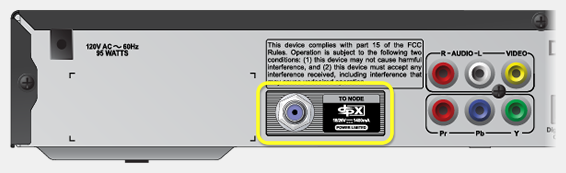
Did this fix your issue?
3
DISH receivers need to stay in the location where they're installed to work well.
If your receiver has been moved, try returning it to its original location.
If you need your receiver to be reinstalled in a new location, call us at 800-333-3474 to schedule an appointment.
Did this fix your issue?
4
Your satellite needs a clear view of the sky to work well. Branches, debris, or snow buildup can interfere with your signal.
If it is safe to do so, remove any obstructions.
DO NOT CLIMB A LADDER OR GO ON YOUR ROOF.
Did this fix your issue?
5
If your satellite dish has been moved or damaged it likely needs maintenance from a professional. Call us at 800-333-3473 to schedule an appointment.
Did this fix your issue?
 Your privacy choices