WeatherNation through MVDDS

In addition to its standard satellite DBS WeatherNation offering, DISH now provides WeatherNation over MVDDS distribution, enabling you to receive WeatherNation content on your computer.
What is MVDDS?

Multichannel Video Distribution and Data Service (MVDDS) is a fixed wireless distribution system that provides consumers with TV programming from ground-based transmitters.

MVDDS reuses direct-broadcast satellite frequencies to distribute video service over large distances.

How to use VLC Media Player to watch WeatherNation

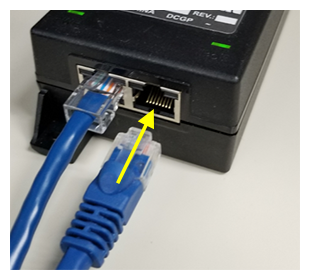
  1. Using an ethernet cable, connect a Windows-based PC or laptop to the IN connection on the Power Over Ethernet (POE) device

    ethernet cables plugging into P O E device
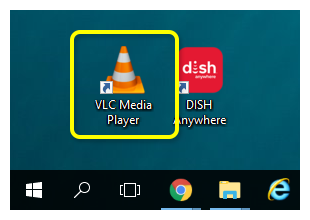
  2. Download and install the VLC media player application on your computer, then open it

    shortcut icon for VLC media player on windows desktop
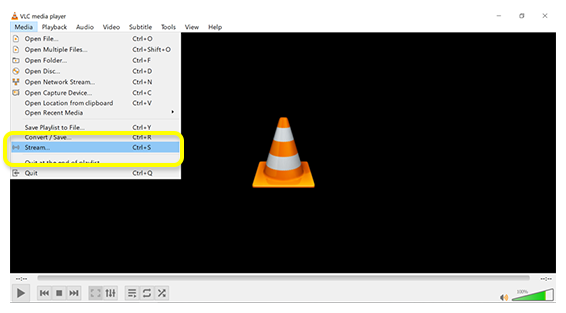
  3. Choose "Stream" from the Media menu

    Media menu in VLC with Stream option selected
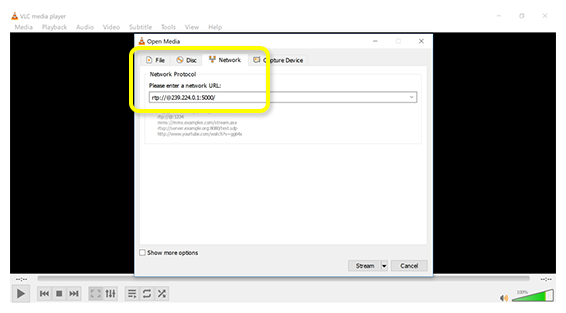
  4. Select the "Network" tab and enter the address for the WeatherNation stream:
    rtp://@239.224.0.1:5000

     Network tab in VLC stream options with text field for URL
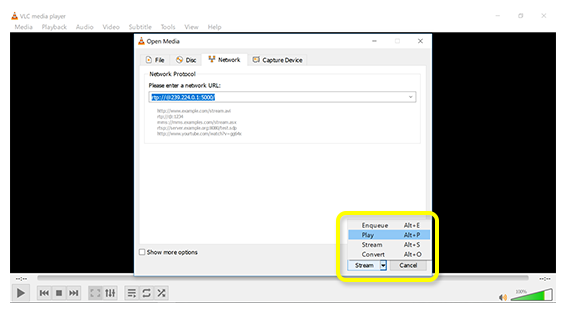
  5. In the bottom right corner, click the drop-down next to "Stream" and select "Play"

    VLC stream dropdown menu with Play option selected
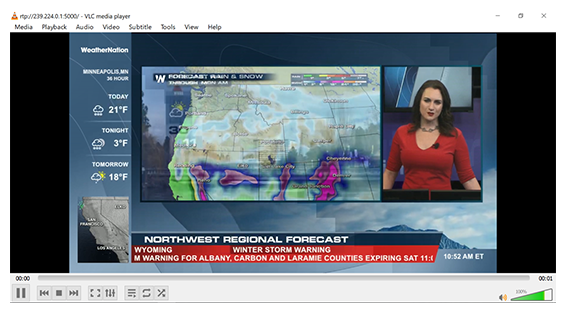
  6. Enjoy WeatherNation!

    Weather Nation playing from internet stream in VLC media player

Questions about your service?

Call 888-745-0454 to speak to a customer service representative between the hours of 8am and 9pm ET.